
Obby Parkour: Mini Games
Kids Games LLCAdventure
4.21.00 Reviews
- Version
- 1.1.7
- Installs
- 1.00M
- Age Rating
- Mature 17+
Screenshots
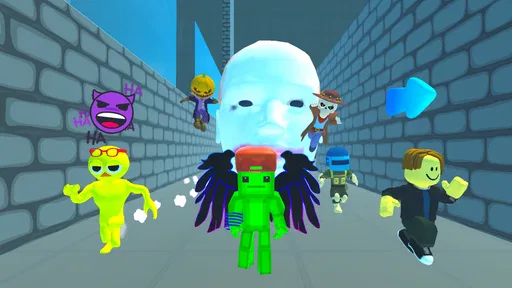
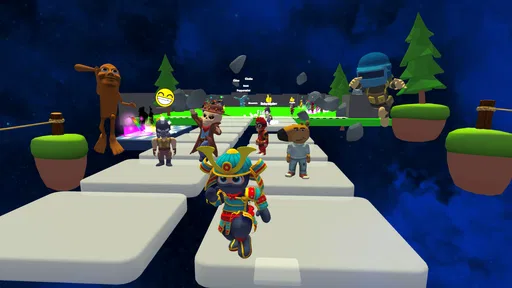
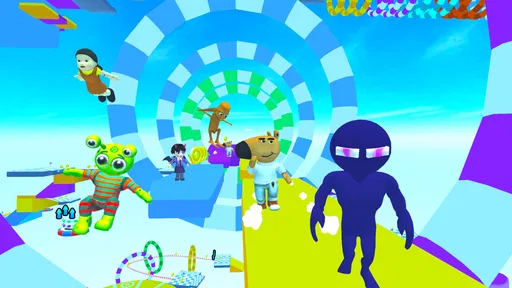
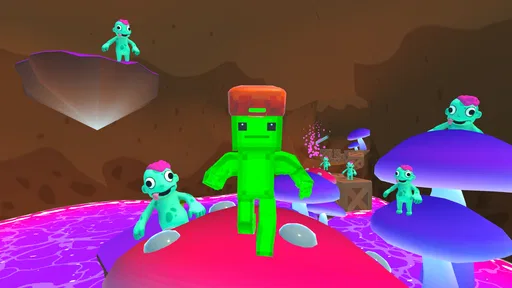
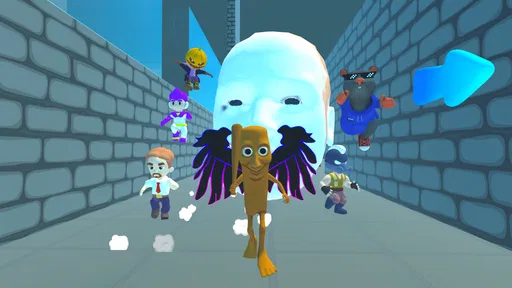
Our Review of Obby Parkour: Mini Games
 Analysis by Appyee
Obby Parkour: Mini Games is the kind of adventure game I open when I want a quick burst of movement rather than a long story or a complicated strategy session. Its basic appeal is easy to understand: guide a character through obstacle-course challenges, time jumps, climb around hazards, and move on to another small test. That simplicity makes it approachable, but it also means your enjoyment depends heavily on how comfortable you are with repeated attempts and learning from mistakes.
I spent time looking at it as a practical mobile game rather than treating the store summary as the whole experience. The most important thing to know is that this is built around short parkour-style challenges and mini games, not a deep adventure campaign. I found that distinction useful because it changes who should install it. If you enjoy improving a route one jump at a time, it can be a pleasant time filler. If you want exploration, character development, or a strong narrative, you may quickly feel that something is missing.
Developed by Kids Games LLC, the game is free to install and has reached over a million installs. It carries a 4.2 average from around two thousand ratings, which suggests that many players find the central idea appealing while leaving room for the usual differences in tolerance for controls, repetition, and optional spending. The age label is Mature 17+, so I would not treat the word “kids” in the developer name as a reason to assume the game is intended for young children.
Getting started without unnecessary frustration
I’d begin by treating the first run as a chance to learn the movement rather than a test of how quickly I can finish. A few deliberate attempts can show whether the challenge feels satisfying on your device, while keeping purchase authentication in mind is a sensible precaution on a shared phone. That low-pressure start makes it easier to decide whether its retry-focused style suits you.
Where players are most likely to get stuck
The first obstacle is not always one of the platforms. With this type of game, the opening minutes can expose several small sources of friction: unfamiliar movement, jumps that need better timing than expected, and a camera view that makes judging distance harder on a smaller screen. I recommend beginning with a light touch and making short movements instead of immediately pushing the controls to their limits. That gives you a better sense of how much input is needed before an important jump.
A common mistake is to treat every failed attempt as a control problem. Sometimes the route is simply asking for a different rhythm. I found it more useful to watch the full movement of an obstacle before trying to pass it. If a platform or hazard follows a pattern, rushing only creates extra retries. The game becomes less irritating when I use the first attempt as reconnaissance rather than expecting to complete every section immediately.
Another sticking point is the difference between reaching a platform and landing safely on it. A jump can look successful while the character is still sliding toward an edge. I learned to release movement slightly before landing instead of holding the same direction throughout the jump. That small adjustment is especially useful when the next surface is narrow or when a climb leads directly into another jump.
Some players will also wonder whether the game is suitable for a younger family member because the visual idea sounds playful. I would make that decision from the Mature 17+ content rating, not from the bright obstacle-course concept. Parents should check the rating and the device’s purchase controls themselves before handing over a phone or tablet.
Simple setup checks that save time
The current version is 1.1.7 and the game requires Android 6.0 or later. Before troubleshooting a failed launch, I would check those two basics first: confirm that the device meets the minimum operating-system requirement and make sure the installation has finished properly. A game that closes during startup or refuses to open can be suffering from compatibility rather than a problem inside a particular level.
Because the game is free to install but includes optional purchases priced from $1.99 to $14.99 per item, I also recommend checking purchase authentication before playing on a shared device. This is not a gameplay tip, but it is a sensible setup step. A child or guest using the device should not be able to complete an unwanted purchase simply because the account is already authenticated.
For smoother play, I would close demanding apps before launching a difficult session, especially on an older phone. That does not change the game’s design, but it can reduce distractions and make touch input feel more consistent. I also prefer playing with the device held in the position I plan to keep for the entire attempt. Repositioning the phone halfway through a jump makes it harder to build reliable muscle memory.
If the game asks to load again after an interruption, I would first give it a moment rather than repeatedly tapping the screen. Rapidly pressing buttons during a slow startup can make it unclear whether the game is responding or simply processing the previous input. When an app behaves normally after a clean restart, the best solution is often a calmer launch routine rather than a complicated fix.
A practical workflow for recovering from failed runs
My preferred way to play is to divide each challenge into three phases. First, I identify the safe surfaces and the places where a fall is likely. Second, I practice the most awkward transition without worrying about speed. Third, I connect the successful sections into one complete run. This approach is more effective than repeatedly starting from the beginning while changing several actions at once.
When a jump fails, I change only one variable on the next attempt. I might start the jump earlier, reduce the sideways movement, or release the control sooner. If I alter all three, I cannot tell which adjustment helped. This is a small habit, but it turns a frustrating mini game into a clear problem-solving exercise.
I also suggest taking a short break after several identical failures. Parkour games encourage the thought that one more attempt must be the successful one, yet tired thumbs and impatient timing usually make the next run worse. A brief pause can be more useful than forcing another ten attempts. The game works best for me in short sessions where I can stop after a meaningful improvement.
For players who are sensitive to spending pressure, I would decide in advance whether the free experience is enough. The presence of optional purchases does not automatically make the game unsuitable, but it does mean that the cleanest experience depends partly on your own boundaries. I would not buy anything simply to escape a difficult section until I had learned whether the problem was my route, timing, or control technique.
One useful recovery habit is to restart the whole app only after distinguishing between a failed run and a technical problem. If the character falls but menus and touch input continue to respond, that is normal game failure and restarting will not improve the next attempt. If controls stop responding across the interface, then closing and reopening the game becomes a reasonable general troubleshooting step.
When the game is not the real cause
Mobile performance problems are easy to blame on the game, but the surrounding device can be responsible. A nearly full storage drive, aggressive battery-saving mode, an overheated phone, or many background apps can affect how any game feels. I would check those conditions before deciding that Obby Parkour: Mini Games is fundamentally unreliable.
Network conditions can also confuse the diagnosis when an app needs to load or refresh content. If the game behaves differently on a stable connection than it does during a weak one, I would test the connection and try again later. I would avoid repeatedly reinstalling the game as a first response, because that can remove local progress or settings depending on how the app handles saved data. A restart and a basic connection check are safer first steps.
If touch controls feel delayed, I would remove a thick or poorly fitted screen protector from the list of suspects, clean the display, and test another app. If every game responds slowly, the phone is the more likely cause. If only this game feels awkward while other touch-based apps work normally, then the issue may be the game’s control design or simply the amount of precision its courses demand.
There is also a difference between a device that cannot run the game well and a player who has not yet adapted to it. I would compare performance across a simple section and a busy section rather than judging from one unlucky attempt. Consistent stuttering, crashes, or freezing point toward technical trouble; consistent movement with missed landings points more toward practice and timing.
How it compares with familiar alternatives
Compared with a traditional platform adventure, this game feels more immediate and less invested in world-building. You are likely to spend more attention on the next jump than on discovering a large map or following a story. That makes it a better fit for a short break than for someone searching for a substantial single-player journey.
Compared with endless runners, the parkour format gives me more room to think. Endless runners often reward quick reactions while the environment keeps moving forward, whereas obstacle courses let me study a difficult section and refine the same action. The trade-off is repetition: a player who prefers constant novelty may find repeated attempts less exciting than the automatic momentum of a runner.
It also differs from physics-based climbing games that turn every movement into a deliberately awkward experiment. Here, the appeal is closer to route execution and timing than to wrestling with unpredictable physics. If you enjoy clean, skill-based retries, that is a strength. If you want surprising emergent moments or a highly expressive movement system, another style of game may suit you better.
The mini-game structure is useful for casual play because it lowers the commitment required for each session. I can play while waiting for an appointment or during a short break without remembering a complicated plot. However, that same structure may feel thin to players who want long-term progression, a rich cast, or a reason to return beyond improving their own performance.
Who should install it, and who should skip it
I would recommend it to players who enjoy obstacle courses, careful jumping, and the satisfaction of turning an awkward route into a reliable one. It is especially suitable for someone who likes games that can be played in small portions and does not mind repeating a section until the timing feels natural. The free entry point makes it easy to test that style without committing to a purchase.
I would be more cautious if you dislike trial and error. The central pleasure comes from failure followed by adjustment, so a player who expects immediate success may interpret the same design as unfair or repetitive. I would also skip it if your main goal is a story-driven adventure, broad exploration, or a deep upgrade system. The parkour challenge is the point, not a small part of a larger role-playing experience.
It is not my first choice for a very young player because of the Mature 17+ rating, regardless of how playful the obstacle-course presentation may seem. It is also not ideal for someone using an older or heavily loaded device if smooth touch response is already a problem. In that situation, a less demanding game with simpler controls may provide a better experience.
My practical verdict
After looking at both the fun and the friction, I see Obby Parkour: Mini Games as a focused casual adventure rather than an all-purpose mobile game. Its strongest quality is the clear loop of attempt, mistake, adjustment, and eventual success. When I approach a course patiently, the controls and obstacles give me a small but satisfying sense of progress.
Its limitations are equally clear. Repeated retries will not appeal to everyone, and the experience does not replace a full adventure with exploration or narrative depth. Free installation is helpful, but optional purchases mean I would set spending safeguards before letting someone else play on my account. The Mature 17+ label also deserves attention before installation on a shared family device.
My advice is to install it when you want short, active challenge sessions and are willing to learn routes through practice. Start by checking Android compatibility, keep the device in good shape, and treat early failures as information instead of proof that the game is broken. The best way to enjoy this game is to improve one movement at a time, not to rush through every course.
For me, that makes it worth trying for fans of mobile obby challenges and compact mini games. I would keep it as a pick-up-and-play option, not as my main adventure game. If that distinction matches what you want from your phone, the free download offers a reasonable opportunity to find out whether its timing-based parkour feels rewarding on your device.
Verdict
Strengths of Obby Parkour: Mini Games
- Short obstacle courses are easy to pick up and play.
- Bright visuals make the levels appealing to younger players.
- Different mini-games add variety beyond standard platforming.
- Simple controls work well on touchscreen devices.
- Quick rounds are suitable for short gaming sessions.
Limitations of Obby Parkour: Mini Games
- Some levels may feel repetitive after extended play.
- Precision jumps can be frustrating on smaller screens.
- Progress may depend heavily on repeated trial and error.
- Ads can interrupt the flow between attempts or levels.
- The game may offer limited depth for experienced players.
Other Releases by Kids Games LLC
View All


Similar Picks in This Category
View All
Roblox
Roblox Corporation4.2

Pokémon GO
Niantic, Inc.3.5

Ninja warrior: legend of adven
TOH Games4.6

Ninja Arashi
Black Panther4.6

Eyes - The Horror Game
Fearless Games sp. j.4.5

Critical Action:Gun Strike Ops
FPS Shooter & Action Game4.3
Frequently Asked Questions
What is Obby Parkour: Mini Games?
Obby Parkour: Mini Games is a casual platform game built around short obstacle-course challenges. You guide a character through jumps, moving platforms, traps, and other hazards while trying to reach the finish line. The levels are designed for quick sessions, making the game suitable for players who enjoy simple controls, colorful environments, and progressively more demanding parkour-style gameplay.
How do you play Obby Parkour: Mini Games?
Gameplay is centered on movement, jumping, and timing. You generally control your character with on-screen controls, steering around obstacles and landing on platforms without falling. Each mini-game or course requires you to observe the route, react to moving hazards, and sometimes repeat sections to learn the correct timing. The controls are easy to understand, although later challenges may require patience and precision.
Is Obby Parkour: Mini Games suitable for children?
The game is generally easy to understand and does not require advanced gaming experience, which can make it appealing to children and casual players. However, parents should still review the app’s age rating, advertising, in-app purchase options, and privacy information before installation. Depending on the device version, online features or third-party advertisements may also affect the overall experience.
Does Obby Parkour: Mini Games require an internet connection?
Some versions of the game may allow basic levels to be played offline, but the exact requirements can depend on the platform and current app update. An internet connection may be needed for advertisements, analytics, new content, updates, or other connected features. Before downloading, it is worth checking the store listing and testing the game with mobile data and Wi-Fi disabled.
Is Obby Parkour: Mini Games free to download and play?
Obby Parkour: Mini Games is typically offered as a free download, allowing players to try its obstacle courses without paying upfront. Free access may be supported by advertisements, and some versions can include optional purchases or other monetization features. Check the Google Play or App Store listing for the latest information about ads, in-app purchases, supported devices, and available content.
Play our best games!


